
MPC 60
Main Article: Akai
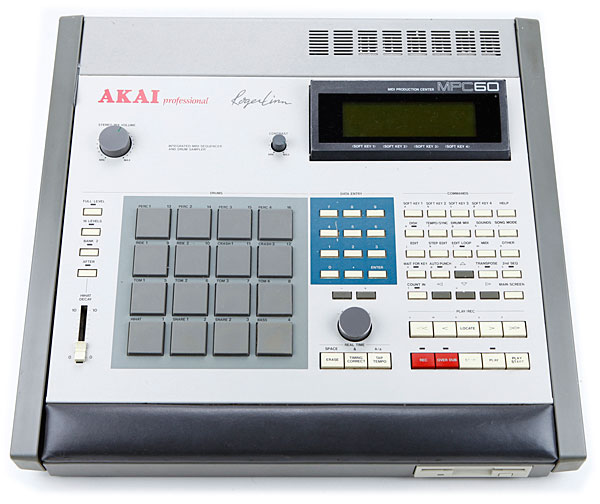
| Release Date | December 8, 1988 |
| Inputs (Balanced) | 1 1/4″ TRS |
| Outputs (Unbalanced) | 2 1/4″ TS, 8 1/4″ TS |
| MIDI | 2 MIDI In, 4 MIDI Out |
| DAC | 16-bit |
| ADC | 12-bit |
| Sample Rate | 40 kHz |
| Polyphony | 16 Voices |
Sampler
The MPC 60’s standard 750kb of RAM allows a total of 13.1 seconds of sampling time. With the memory expansion board, an additional 750kb of RAM increases the sampling time to 26.2 seconds.
| Bit Rate | Bit Depth | Sample Length |
| 12-Bit | 40Hz | 13.1 Seconds |
| 12-Bit | 40Hz | 26.2 Seconds (with memory expansion) |
Disk Image Formatting
Launch the HxC Floppy Emulator Software
Select “Load Raw Image” to create a new disk
Enter the following settings:
Track Type: IBM MFM
Bitrate: 250000
RPM: 300

Number of Track: 80
Number of Side: 2 Sides
Sector per track: 10
Sector size: 512 bytes
Sector ID start: 1
Interleave: 1
Skew: 0
Format value: 246
Auto GAP3 [Selected]
Select “Create Empty Floppy”
From the main menu select “Export”
Export the file to “IMG file (RAW Sector file format)” (.img)
Transfer the blank image to USB stick and insert in MPC 60
(Using MPC 60 OS version 2.14)
Press “DISK” to open the “DISK” menu
Press “7” to select “Format a floppy”
The screen will read “This will erase the entire disk!”
Press “Soft Key 1” to select “Format it”
MPC 60 Disk Library
Factory Library
Studio set
Rock set
Dry set
Synth set
MPC 60 / MPC 60 MKII Library
SL601 Samba set
SL602 Ambience set
SL603 New ’60s set
SL604 Loft-drum
SL605 Real-drum
SL606 Solid-drum
SL607 Native-drum
SL608 Live-drum
SL609 LA-1 set
SL610 UK-1 set
SL611 Percuss-1
SL612 Power-drum
SL613 Metal-drum
SL614 UK-2 set
SL615 UK-3 set
SL616 UK-4 set
SL617 UK-5 set
SL618 UK-6 set
SL619 UK-7 set
SL620 UK-8 set
SL621 Mix-1 Dry
SL622 Mix-2 Gate
SL623 Mix-3 Dry
SL624 Rickyset 1
SL625 Rickyset 2
SL626 Rickyset 3
SL627 Natural & Voxset
SL628 Dance & Voxset
SL629 New Funk
SL630 Brushes